
Contents
Running With a GPS Watch: Beyond Just Distance and Pace
Your GPS watch can do more than track miles. Learn how to use your watch data effectively without becoming obsessed with numbers.

Quick Hits
- •GPS watches provide useful data—distance, pace, heart rate—but can also create unhealthy obsession
- •Most useful metrics: distance, total time, heart rate trends over time, weekly mileage
- •Overrated metrics: real-time pace (fluctuates too much), VO₂max estimates (not accurate), training effect scores
- •The best approach: gather data during runs, analyze later, don't stare at the watch while running
- •Entry-level watches ($100-200) provide everything most runners actually need
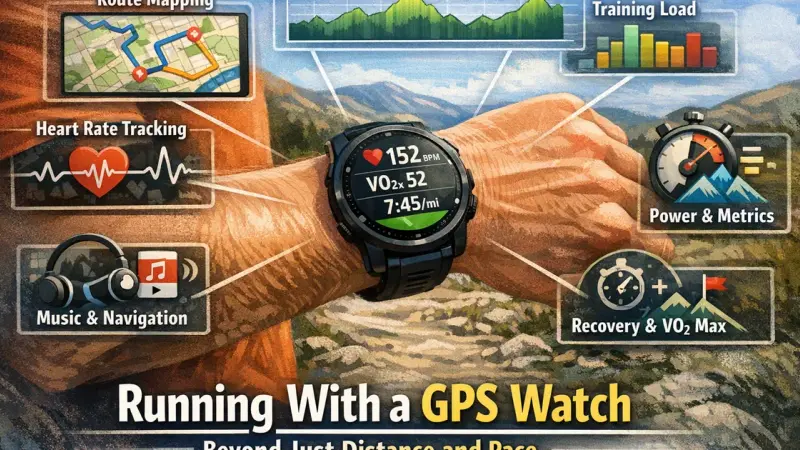
Your GPS watch is the most sophisticated piece of running equipment ever created.
But are you using it right? Or is it using you?
What Modern Watches Can Do
The Basics
Every GPS watch provides:
- Distance (GPS tracking)
- Pace (real-time and average)
- Time
- GPS mapping of routes
The Intermediate Features
Most $150+ watches add:
- Heart rate (wrist-based optical)
- Training status/load estimates
- Recovery time suggestions
- VO₂max estimates
- Cadence
The Advanced Features
Premium watches ($300+) may add:
- Maps and navigation
- Music storage
- Advanced running dynamics (ground contact time, vertical oscillation)
- Power estimation
- Multi-sport modes
- Longer battery life
Metrics That Matter
Tier 1: Essential
Distance
- Track daily, weekly, monthly
- Foundation of training volume
- Reasonably accurate (1-2%)
Total Time
- Simple but valuable
- Time on feet matters for endurance
Average Pace
- More useful than real-time pace
- Tracks training progress over time
Weekly/Monthly Mileage
- The big-picture view
- Most important metric for improvement
Tier 2: Useful
Heart Rate Trends
- Track over months, not minutes
- Declining HR at same pace = fitness improving
- Elevated resting HR = fatigue or illness
Cadence
- If consistently low (<160), worth improving
- But don't obsess over exact number
Elevation Gain
- Helps explain tough runs
- Useful for trail runners
Tier 3: Nice to Have
Training Load Tracking
- Estimates of overall training stress
- Useful directionally (trending up or down)
- Don't take absolute numbers seriously
Pace Zones
- Helpful for structured workouts
- Let watch beep when you're off target
Metrics to Ignore (Or Use Cautiously)
Real-Time Pace
The problem: GPS pace fluctuates wildly—especially on trails or in urban areas.
What happens: You speed up and slow down chasing a bouncing number.
Better approach: Use lap pace (per mile/km) or average pace. Ignore instantaneous readings.
VO₂max Estimates
The problem: These are estimates based on HR and pace, with significant error margins.
The truth: Your watch cannot measure VO₂max—only a lab can.
Better approach: Treat as rough trend indicator, not accurate measurement.
Training Effect Scores
The problem: Black-box algorithms with unclear methodology.
Better approach: Track objective metrics (mileage, time at effort) instead of proprietary scores.
Recovery Time Predictions
The problem: Your watch doesn't know your sleep, nutrition, stress, or individual recovery capacity.
Better approach: Listen to your body. If you feel recovered, you probably are.
Watch Screen Setup
While Running
Recommended data fields:
- Distance
- Total time
- Current lap pace (smoother than instant pace)
- Heart rate (optional)
Avoid: Too many fields. Cluttered screens cause constant watch-checking.
After Running
Worth reviewing:
- Total distance/time
- Average pace
- Average HR
- Pace splits
- Elevation profile
Periodically review:
- Weekly/monthly totals
- HR trends at same pace over months
- Mileage patterns
Avoiding Data Obsession
Signs You're Over-Tracking
Watch checking addiction:
- Looking at watch every few seconds
- Adjusting pace based on instant data
- Anxiety when GPS is searching
Data analysis paralysis:
- Hours reviewing runs
- Upset by minor variations
- More time analyzing than running
The run doesn't count mentality:
- Ruined if watch dies
- Upset by GPS glitches
- Running only for the data
Healthy Watch Use
Gather data, analyze later:
- Glance occasionally during run
- Review thoroughly afterward
- Don't let the watch dictate the run
Periodic watch-free runs:
- Run by feel only
- Reconnect with running itself
- Break the data dependency
Focus on trends, not single data points:
- One slow run means nothing
- One high HR day means nothing
- Patterns over weeks matter
The Balance
Your watch is a tool to serve your running, not the other way around.
Use it to:
- Track progress over time
- Ensure consistency
- Hit workout targets
Don't let it:
- Dictate every pace decision
- Ruin your run when data is imperfect
- Replace feel and experience
Choosing a Watch
Budget Tier ($100-150)
Examples: Garmin Forerunner 55, Coros Pace 2
Features: GPS, heart rate, basic metrics, smartphone notifications
Best for: Most recreational runners, beginners, those who want simplicity
Mid-Range ($200-350)
Examples: Garmin Forerunner 265, Coros Apex 2
Features: Above plus music, better displays, more analytics, longer battery
Best for: Serious recreational runners, those wanting more data
Premium ($400+)
Examples: Garmin Forerunner 965, Fenix 7, Coros Vertix 2
Features: Everything plus maps, extended battery (weeks), premium materials
Best for: Ultra runners, trail runners needing navigation, gear enthusiasts
What Most Runners Need
Honestly? A $100-200 watch provides every feature most runners will use meaningfully.
Premium features are nice but rarely necessary.
Watch Care
GPS Accuracy Tips
- Start GPS search before running (let it lock on)
- Wait until strong signal
- Avoid tall buildings at run start
- Update watch firmware regularly
Battery Management
- Charge regularly (don't let fully drain)
- Turn off when not using
- Adjust GPS mode for ultra-long runs if needed
Heart Rate Accuracy
- Wear tight enough to minimize movement
- Wear slightly above wrist bone
- Wet skin before running (helps optical sensor)
- Accept limitations (not perfect)
GPS watches are remarkable tools that have transformed how we track and analyze running. Used well, they provide valuable insights and track meaningful progress. Used poorly, they become anxiety-inducing devices that detract from the running experience. Gather the data, analyze thoughtfully, and remember: the running matters more than the tracking.
Sync your watch data to your dashboard for deeper analysis.
Key Takeaway
GPS watches are useful tools but can become unhealthy obsessions. Focus on a few meaningful metrics (distance, time, HR trends) and ignore the noise. Gather data during runs, analyze thoughtfully afterward, and remember that running itself matters more than tracking it perfectly.
Frequently Asked Questions
What metrics should I actually care about?
How accurate is GPS pace?
Should I run by heart rate?
Are wrist-based heart rate monitors accurate?
Do I need a $500+ watch?
References
- Running technology research
- GPS accuracy studies
- Coaching recommendations